Researching AI surfacing strategy for Copilot
Established a unified, scalable AI Copilot strategy and design framework for an enterprise data management platform serving 5,000+ enterprise customers and 84+ Fortune 100 companies.
Business Impact: Aligned multi-product teams under a shared AI interaction language, preventing fragmented adoption across 4 core workflows (curation, generation, automation, recommendation).
Execution: Synthesized 20 weeks of literature research, competitive UX pattern analysis, and trust frameworks into reusable design guidelines and prototype directions.
Product
AI Copilot / Custom GPT experience for an enterprise data management platform
Role
Senior UX Designer (UX Research | AI Interaction Strategy | Design Framework | Prototype Direction)
Duration
20 weeks
Users
Data engineers, data stewards, analysts, platform administrators, product designers, and enterprise users
Overview
Enterprise data management platforms support highly complex workflows across data discovery, governance, quality, curation, automation, and monitoring.
In 2023, as AI became central to enterprise tools, the assignment was not just to introduce another AI Copilot, but to define how AI should behave, where it should appear, what level of control users should retain, and how trust should be built in expert workflows.
The project explored AI Copilot interactions across conversational interfaces, insight-based recommendations, content generation/modification, contextual guidance, and workflow-level automation in context of the company's domain and the broader AI design strategy.
Problem Statement
Business POV
AI adoption at scale without interaction clarity can become fragmented, inconsistent, and difficult to trust.
Multiple teams within the company were exploring AI assistance across its product ecosystem, but AI interventions needed a clear strategy before being embedded into enterprise workflows. There was no shared framework, different teams were interpreting "AI Copilot" differently: as chat, recommendations, automation, generation, or contextual assistance. This lead to inconsistent user experiences.
User POV
Unlike retail usage, expert users need AI that does not feel like a black box
In a high-stakes data ecosystem, an unverified AI decision can corrupt an entire ingestion pipeline or violate strict compliance frameworks. Data operators cannot manage risk blindly. If the system suggests a new data quality rule, the user must instantly see its rationale, verify its data provenance, and have the absolute agency to modify or reject the action before it impacts downstream analytics.
Challenges
Translating nascent AI principles into usable design guidance
The research had to move beyond generic or abstract AI UX principles and become practical enough for designers to apply inside real product workflows.
Balancing proactive assistance with user agency
AI needed to anticipate needs and reduce cognitive load in the right scenario's and without feeling intrusive or making decisions on behalf of expert users.
Defining global vs local AI behaviour
Understanding of when AI should appear globally as a copilot, locally inside a workflow, inline within tables/forms, or contextually through recommendations.
Building consistency across multiple AI interaction patterns
Identifying what would unify AI across chatbox/conversational interfaces, insight-based recommendations, content generation/modification, and automation-led flows.
Design Brief
To help product and design teams create AI Copilot experiences that were trustworthy, context-aware, consistent, explainable, and scalable across enterprise workflows.

Research Strategy
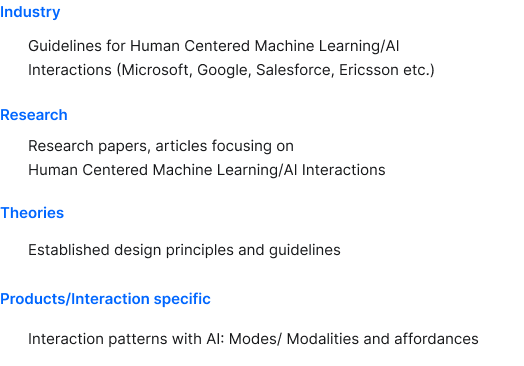
Literature Study
- What are the key characteristics of a good human-AI relationship?
- Which principles contribute to those characteristics?
- Which existing theories, guidelines, and patterns have been established and proven for a good UX that can act as precedence?
- What are the fundamental capabilities and steps involved in human-AI interactions?
Affinity Mapping
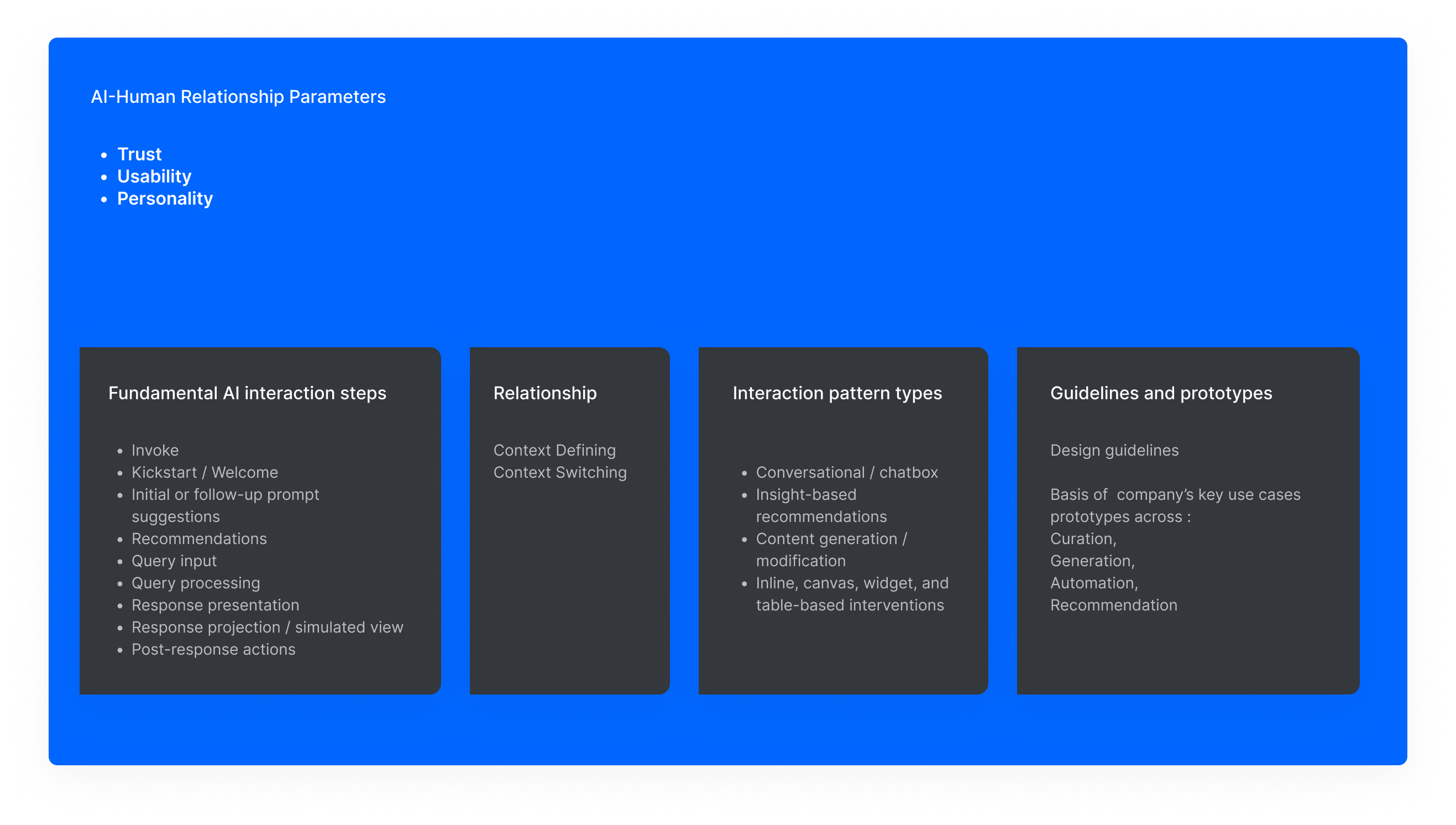
Key observations from literature and industry references were grouped into themes. These themes were further synthesised into three core AI-human relationship parameters:
- Trust
- Usability
- Personality
These became the evaluation lens for the rest of the study.
Competitive UX Analysis
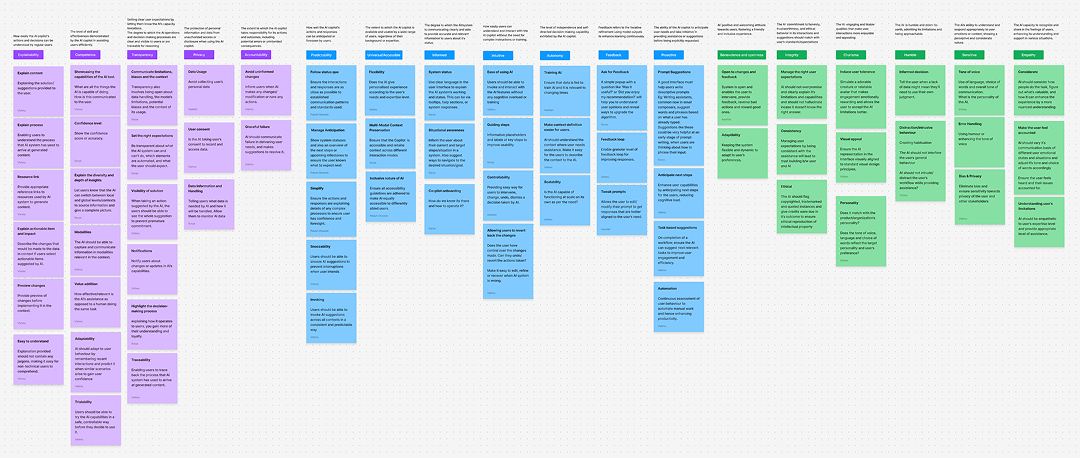
AI instances from different domains and form factors were studied basis of the parameters derived in the literature study, including enterprise copilots, consumer AI tools, design tools, software development tools, marketing tools, and data management platforms.
The analysis covered:
- conversational interfaces(Chatbox)
- inline recommendations (Coding)
- canvas-based experiences
- tables, widgets, and content generation patterns
Product and Use-Case Mapping
Studied the company's product ecosystem at a high level to identify AI intervention opportunities across:
- Curation
- Generation
- Automation
- Recommendation
These were then translated into sample prototype directions and design guidelines.
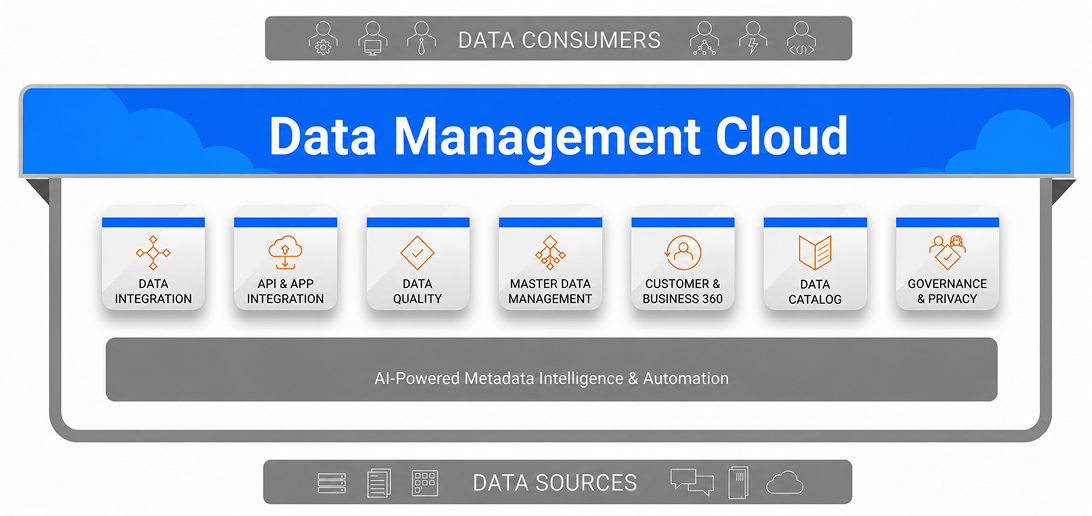
Key Discovery Outcomes
What we uncovered
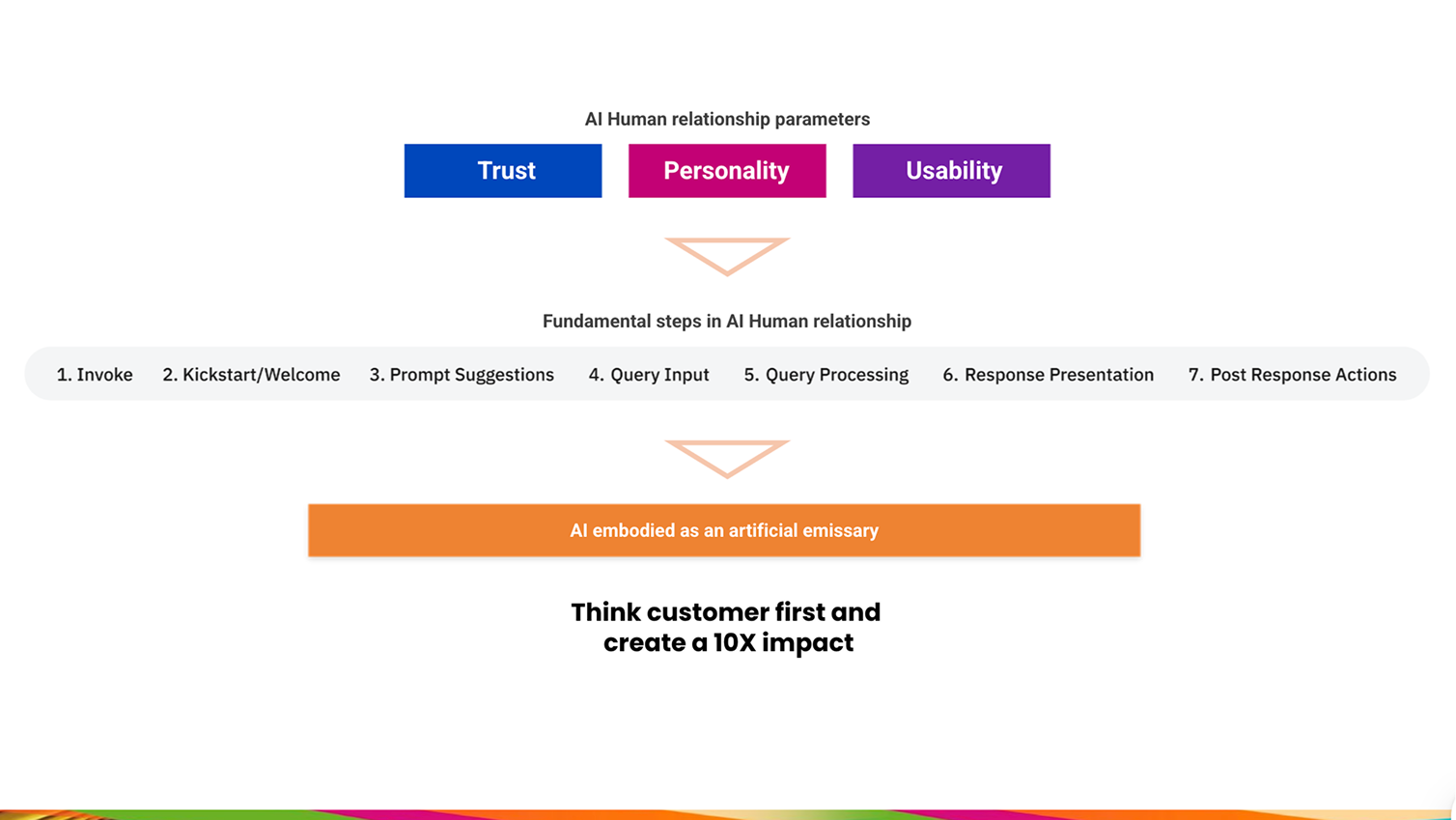
AI Copilot experiences needed to be understood as a system of relationships between:
- user intent,
- workflow context,
- AI capability,
- invocation method,
- response format,
- confidence level,
- and post-response actions.
AI assistance needs to behave differently depending on whether it is being used for curation, generation, automation, recommendation, explanation, or correction.
What we aligned
The team aligned on three foundational AI-human relationship parameters:
Trust
Users need confidence that AI is reliable, transparent, privacy-conscious, accountable, and explainable.
Usability
AI should be easy to invoke, predictable, accessible, informative, proactive where useful, and adaptable to user needs.
Personality
AI should be helpful, humble, honest, sensitive to user context, and aligned with the product's tone and identity.
What we rejected
A generic chatbot-first approach was not enough.
The research showed that conversational AI is only one pattern. In many enterprise workflows, AI may be more useful as:
- inline guidance,
- contextual recommendations,
- table-level insights,
- workflow nudges,
- generated content,
- simulated previews or post-response actions.
Balancing the scales: expert user trust & enterprise AI adoption
To design meaningful AI interventions, we needed to balance expert user expectations with the company's need for scalable AI adoption. Data consumers needed powerful, actionable recommendations, while the business needed a way to scale AI across products without creating fragmented experiences—ensuring consistency, transparency, and predictability.
What users needed
Clarity and explainability
Why AI was suggesting something, what information it used, and what could happen next.
Control and reversibility
Ability to accept, reject, edit, regenerate, skip, or undo AI-generated actions.
Context-aware support
AI that understood working globally across the product or locally inside a specific asset, table, workflow, or task.
Predictable behaviour
Consistent invocation, consistent response structures, and clear communication patterns.
What the business needed
Consistent AI design language
The company needed a shared vocabulary for designing AI interactions across product teams.
Scalable guideline system
Designers needed practical guidance that could be reused across multiple AI use cases.
Trustworthy enterprise AI adoption
The AI Copilot needed to feel credible enough for enterprise workflows where users make operational decisions.
10x impact without workflow disruption
AI needed to create meaningful productivity gains without overwhelming users or breaking established workflows.
How Might We?
HMW make AI assistance trustworthy enough for enterprise users to understand, verify, and act on?
HMW surface AI at the right moment without increasing cognitive load or interrupting expert workflows?
HMW create reusable AI interaction patterns that work across chat, recommendations, generation, automation, and contextual guidance?
The Framework Matrix
Before jumping into prototypes, the team deconstructed AI Copilot experiences into a reusable framework. This was followed by formulating guidelines and prototypes built across curation, generation, automation, and recommendation use cases.
Design Highlights
1. Defining the AI-human relationship model
We reframed the AI Copilot from a feature layer into a relationship model, helping the team define how AI should earn trust, communicate limitations, support action, and remain aligned with enterprise user expectations.

Artificial Emissary — a trusted ally that supports users in context, understands immediate needs, and enables a more meaningful relationship than transactional assistance.
Instead of treating the copilot as only a tool or chatbot, it was to be established how AI should behave ?
The answer was as a strategic partner
This led to the concept of the AI as as both a professional and personal alter ego, positioned as a trusted ally finely attuned to immediate needs and referred to as their A.E. (Artificial Emissary), embodying a strategic partner.
2. Creating a practical AI design guideline system
To bridge research and execution, we translated AI UX principles into a practical guideline system that product designers could use while designing AI interventions across different workflows.

Make the research actionable rather than just theoretical
The guideline structure included:
- what each interaction step is about,
- prototype snippets,
- guidelines,
- do's and don'ts,
- industry examples,
- and relevant sub-themes.
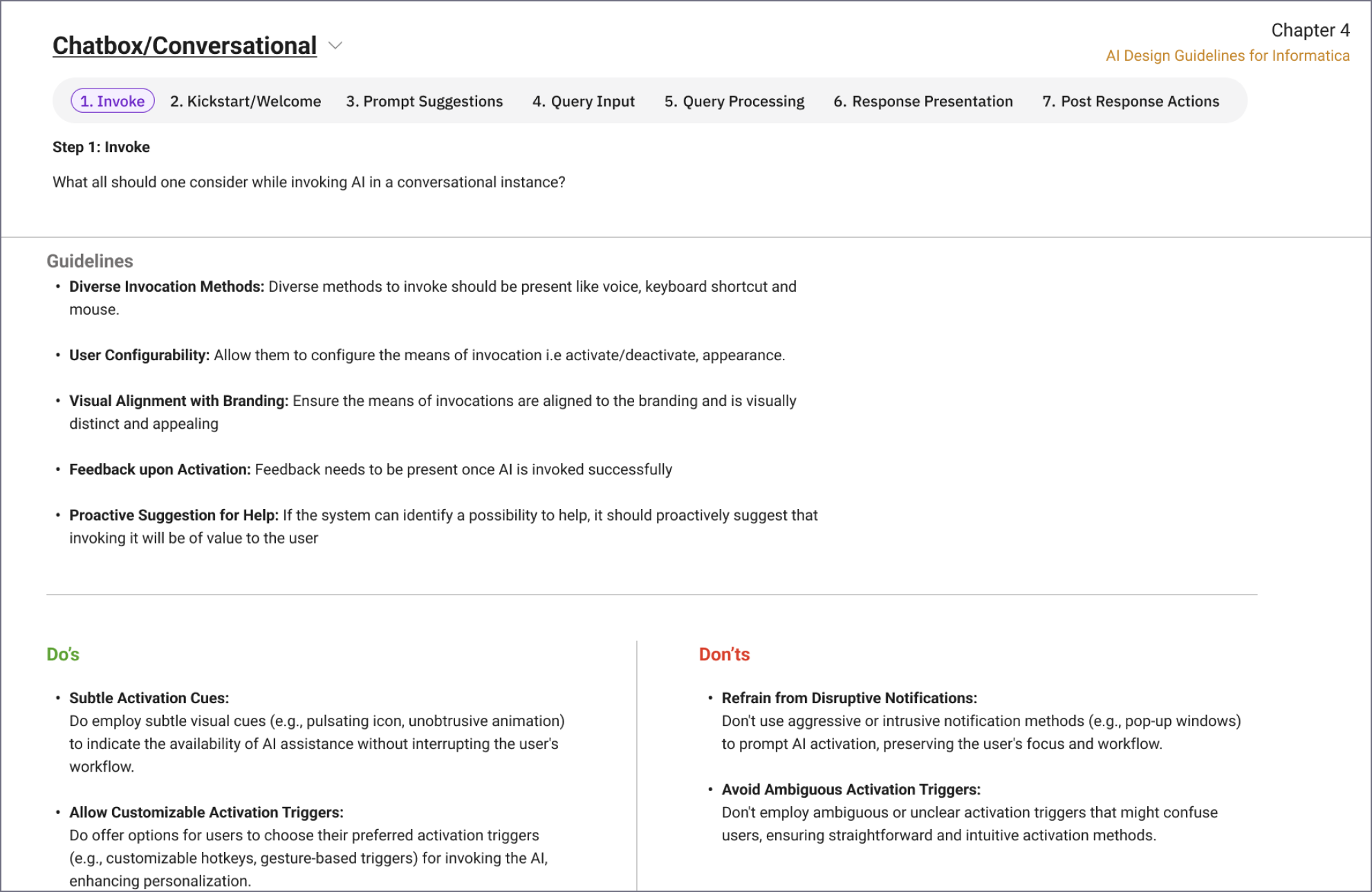
3. Deconstructing AI invocation patterns
We defined invocation as a critical moment. AI needed to be discoverable, context-aware, and consistent across global navigation, local workflows, inline recommendations, and third-party surfaces.

Need for consistent icon placement, clear affordance, contextual invocation, proactive invocation during critical moments, and support for global/local contexts
Studied invocation examples across Microsoft Copilot, Intuit, Ataccama, Atlan, GitHub Copilot and many others
4.Mapping drivers and detractors for AI trust
We built a driver/detractor lens to evaluate each AI parameter i.e Trust, Usability and Personality and their sub themes, helping the team identify which design decisions would strengthen user trust and which could create hesitation, confusion, or over-reliance.
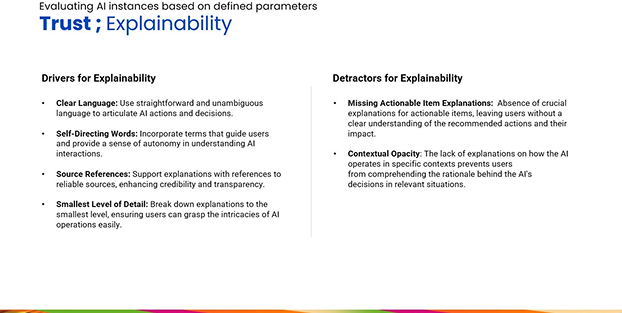
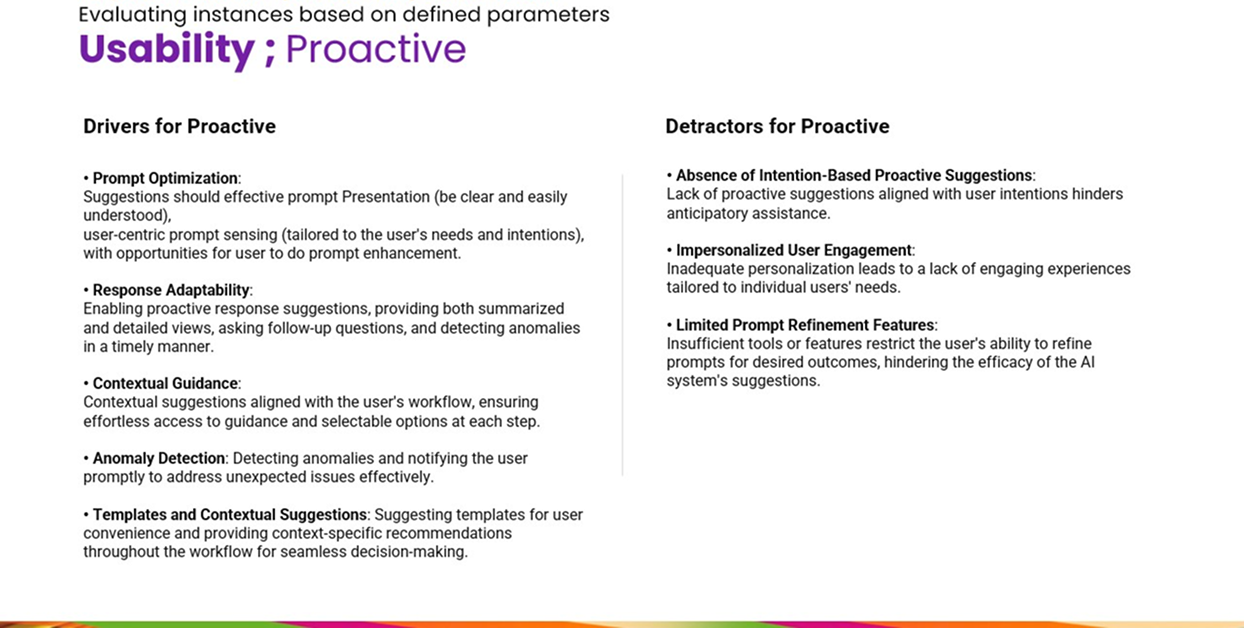
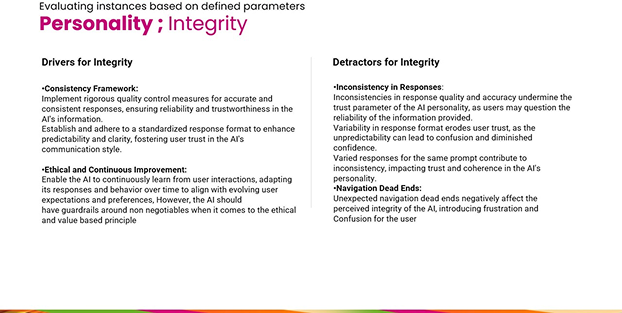
Similar evaluation was carried out to derive drivers and detractors for all parameters (15+) under Trust, Usability and Personality.
5. Applying the framework to enterprise use cases
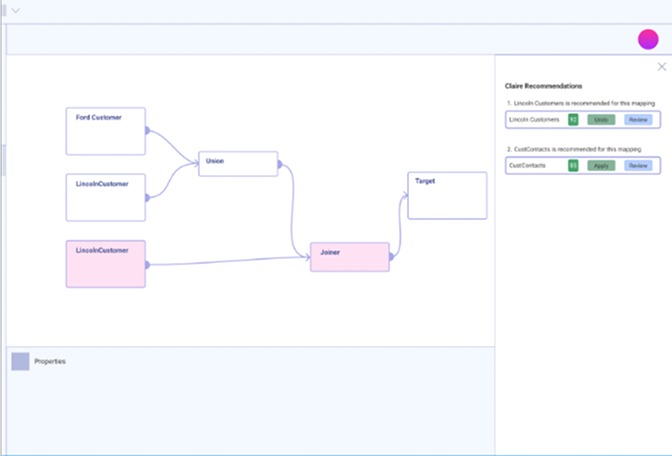
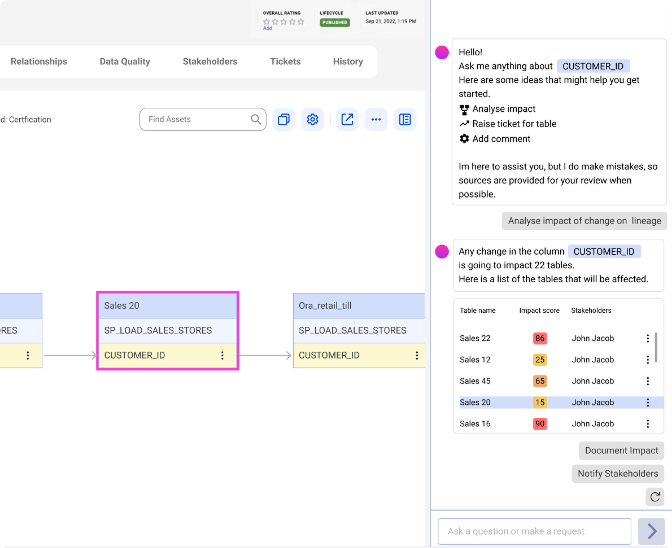
The research was translated into prototype directions showing how AI could appear inside enterprise workflows — not just as a chat interface, but as contextual recommendations, generated content, workflow support, and action-oriented guidance.
Studied product micro services, defined user scenarios, explored multiple interaction patterns, and created prototype snippets for different AI interventions
The framework was applied to key use cases across:
- curation
- generation
- automation
- recommendations
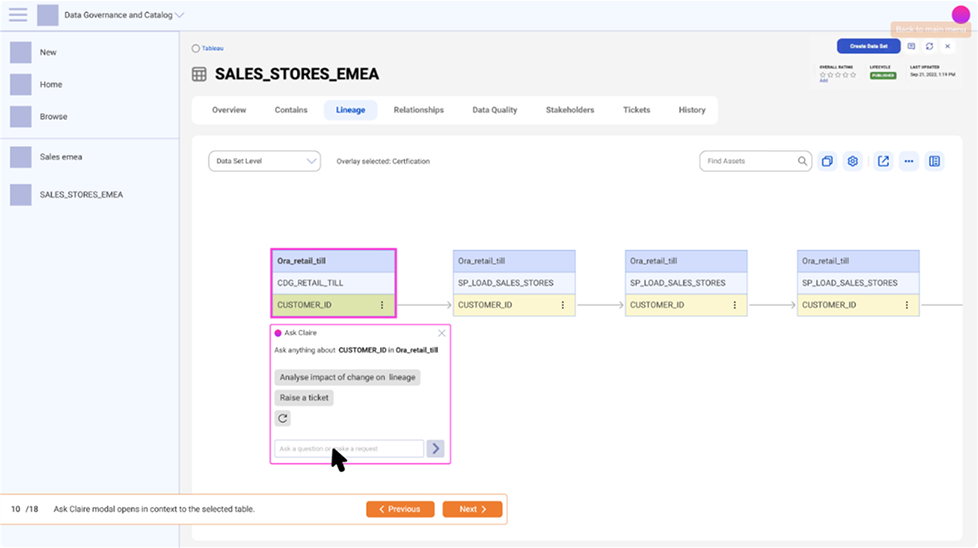
6. Supporting Custom GPT feature exploration
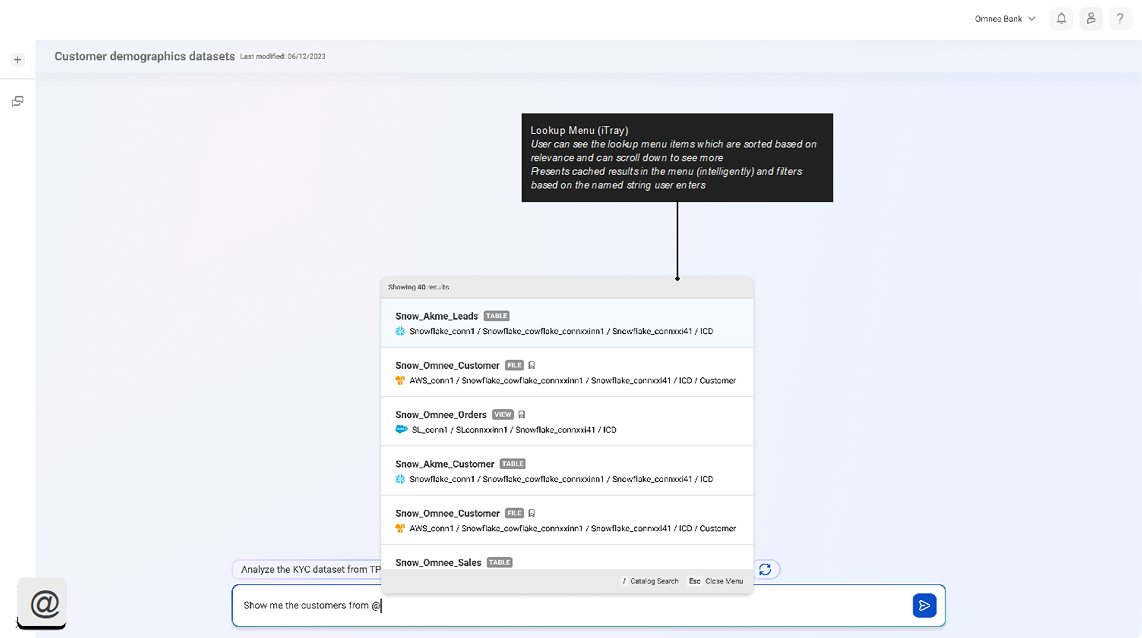
We extended the framework into Custom GPT interaction features, exploring how responses should be structured, how referenced assets should be surfaced, how users should recover from unhappy paths, and how onboarding should set expectations around AI capabilities.
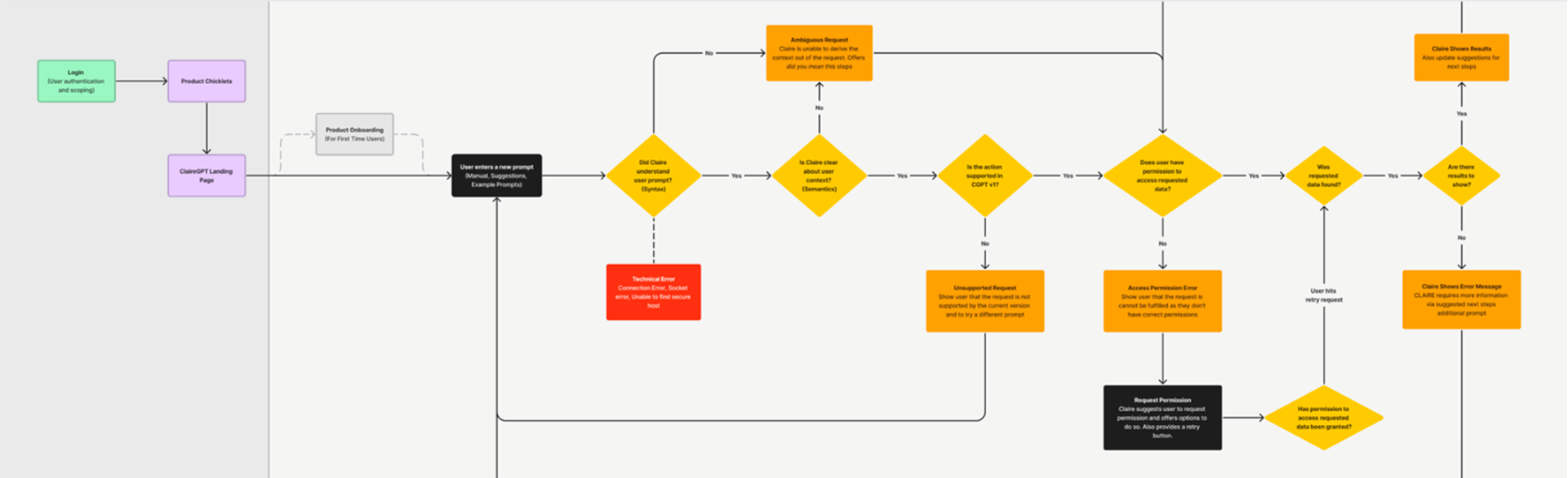
Mapping onboarding and unhappy paths
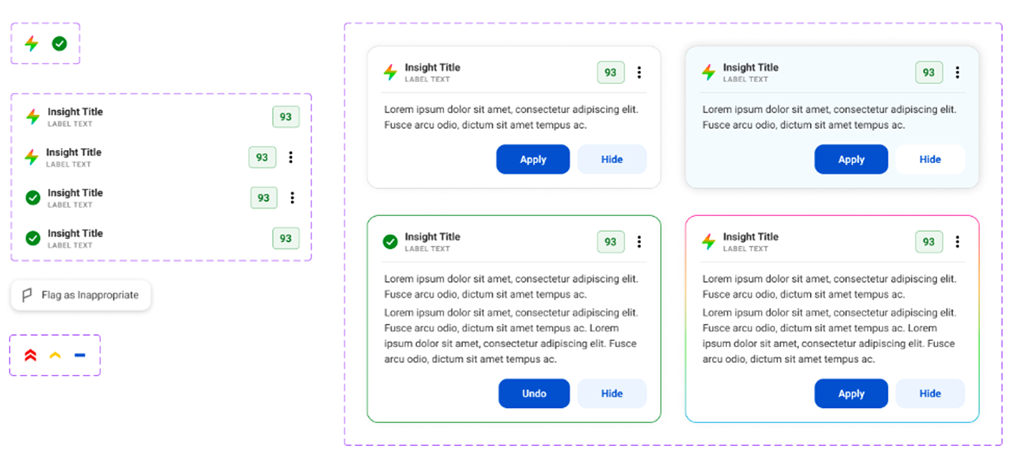
Component library documentation
for AI copilot's insight cards
and tabs (top)
Asset referencing through
the Lookup menu (right)
7. Visual behaviour and assistant personality
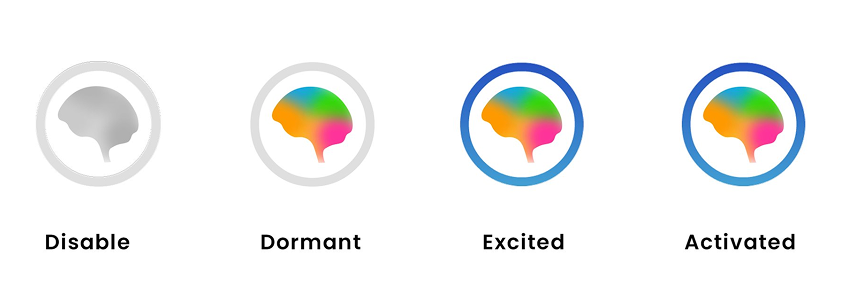
Contributed to ideation around the assistant's visual behaviour and personality states, while the detailed branding and VX execution was led by another designer. This helped connect the interaction strategy with how the assistant could appear, stay dormant, become active, and respond contextually inside the product experience.

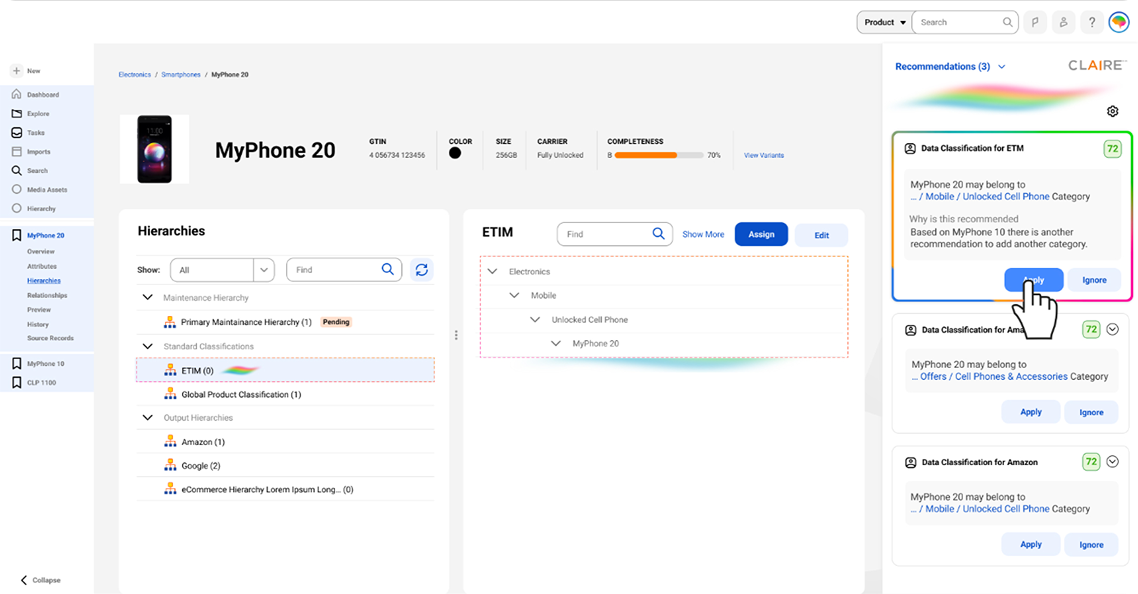
Different states and modalities
along with their states
for different AI affordances
Outcome
The engagement produced a reusable AI UX foundation for the company's copilot experience.
Research outcome
A structured understanding of human-AI relationship parameters:
- Trust
- Usability
- Personality
Strategy outcome
A design philosophy positioning AI as an Artificial Emissary aligned with the company's customer-first and 10x impact vision.
Framework outcome
A reusable interaction model connecting:
- relationship parameters,
- fundamental AI interaction steps,
- global/local context definition,
- interaction patterns.
Team value
The work gave designers and stakeholders a shared vocabulary for AI interaction design, reducing the risk of fragmented AI experiences across product teams.
Design outcome
A guideline system and prototype directions for designing AI interventions across:
- chatbox/conversational interfaces,
- insight-based recommendations,
- content generation/modification,
- curation,
- generation,
- automation,
- recommendation-led workflows.
Note: The interaction patterns and their application across the product ecosystem are subject to NDA and were developed during later phases of the engagement. Examples from other projects demonstrating how the Human-AI Framework translates into UI and product experiences are available upon request.